

Cost Intelligence
See what your AI use costs across the organization.
Cost Intelligence shows where your AI budget is going, what looks anomalous, and the highest-leverage changes to make. It fills in as your team's AI use is captured, so a brand new organization starts empty.
The month at a glance
At the top, four figures track the current month: your spend so far, a forecast for where it lands by month end, your budget, and how much of it is left. The budget and remaining figures appear once someone sets a budget.
What feeds these numbers
Not every dollar is known with the same certainty, so Cost Intelligence shades each one by how sure it is and shows the split in a short key beneath the headline.
Actuals are the figures a connected vendor reported on its own bill. When you connect an AI vendor integration such as Claude API, Claude Enterprise, or OpenAI, Proxon reads the vendor's real charges and treats them as confirmed. A seat fee Proxon prices from a standard estimate, such as the default Claude Enterprise seat price, stays Estimated until you enter your own price.
Estimated from observed usage is everything else. It is the usage the Proxon observers measured, priced from each plan's rate, so it is a well-grounded estimate rather than a billed figure.
The headline blends the two. Before you connect a vendor, your spend is estimated from observed usage. Connecting that vendor turns its share of the total from an estimate into a confirmed figure, with nothing else you have to do.
Set a budget
The budget and remaining figures, and the budget pace on the chart below, appear only once someone sets a budget. Setting one takes the right permissions, so if you cannot, ask an admin.
You set a single monthly cap for the whole organization, or break it down by department or by team. Department and team budgets add up to your overall budget automatically.
Daily spend vs. budget pace
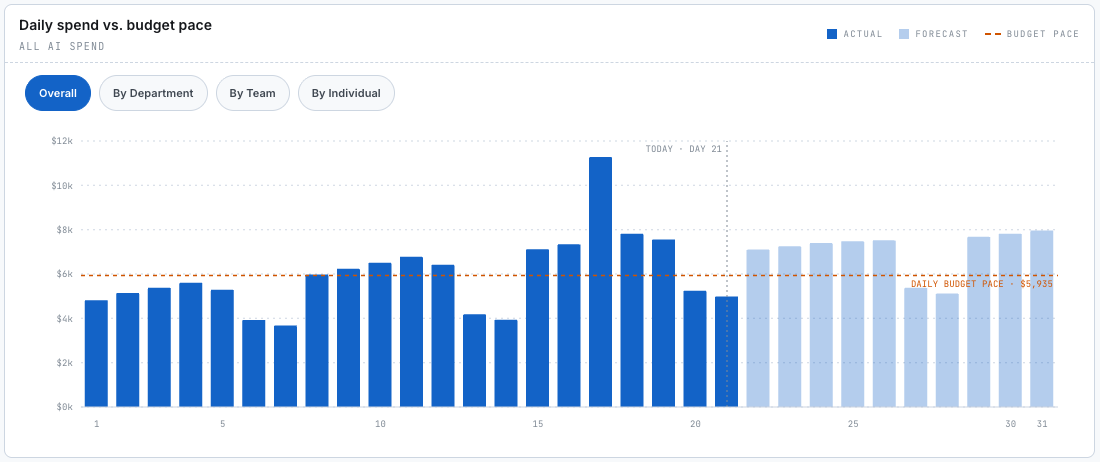
Once a budget is set, the Daily spend chart tracks how you are pacing against it. Each day's bar carries the same Actuals and Estimated shading as the key above, the rest of the month is shown faded as a forecast, and the dashed line is the daily budget pace that keeps you on target. View it overall, or break it down by department, team, or individual.
Explore your spend
The Spend Explorer lets you follow the money down to where it is going. Switch lenses to see the same spend by provider, model, individual, department, or team, with each connected vendor appearing as its own source. Chase a rising number to the team or the model behind it.
Plan Usage
Plan Usage lists every AI plan your organization pays for, one row per plan. Each row shows the vendor, how many seats were bought, how many people are actually using it, and what the plan costs each month, with the same Actuals and Estimated marks as the rest of the page.
Find savings and anomalies
Cost Intelligence also points you at what to do about the spend. It surfaces recommended actions with the savings each would return, and it flags anomalies worth investigating, such as a sudden jump in one team's or one model's cost.